A delivery consists of one or more envelopes. An envelope is a JSON file that specifies what content must be delivered to which recipients, furthermore the envelope can specify how the recipients can interact with the message that will be placed in their mailbox.
- It is guaranteed that all the recipients on the envelope receive the message or none of them do.
When the Digital Post Platform (DPP) receives a delivery request, it will:
- Process each of the envelopes in the S3 bucket, this involves:
- Validating that the envelope conforms to the Envelope schema.
- Ensuring that the referenced message body and attachments are present in the S3 bucket.
- Copying of the message body and attachments to the DPP's server, from where they will be served to the recipients. During this copy each unique body or attachment is encrypted with a unique key that will only be available to the recipients.
- As envelopes are validated and the content they reference is copied, each of the envelopes goes through the delivery process that involves:
- Checking that the Sender is allowed to use the utilized message features.
- Identification of the recipients and their mailboxes.
- Checking that the recipients are all subscribed to the Sender.
- Ensuring the virus scanner clears the message's content.
- Preparing a message to become available to all its recipients at the same time.
In addition to the at-rest encryption that may be provided by your chosen S3 service, the objects may be encrypted before uploading them to the S3 bucket and the encryption key passed on with the delivery request. The Digital Post Platform (DPP) will then decrypt the content for processing and encrypt each with a unique key only the recipients can access.
The content must be encrypted using AES 256. The DPP supports using either CBC or GCM mode, the latter being the preferred mode. Note, if using CBC then the DPP will not be able to detect decryption failures, e.g. due to incorrect encryption key or corrupted data. So in this case it is important to specify a hash for the content in the envelopes, so the DPP will be able to detect that the cleartext content is not the expected content. Regardless of the encryption mode - or encryption at all - it is always a good practice to specify the cleartext content hash in the envelopes.
Support for using GCM mode is currently not supported by the DPP. Support is planned to be released in the near term.
Data encryption using AES-256 in GCM mode must be encoded in chunks of a maximum of 1 MB. A total of 20 chunks may be used, limiting the encrypted data to approximately 20 MB.
Encoding: 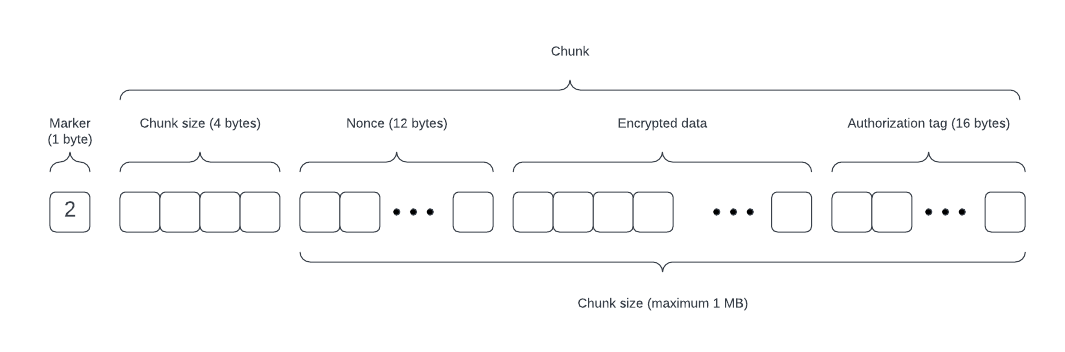
- Encryption Indicator:
- The first byte must be set to
2to indicate that the data is AES-256 GCM encrypted.
- The first byte must be set to
- Chunked Encryption:
- Data must be divided into chunks, each a maximum of 1 MB.
- Each chunk must have the following structure:
- Chunk Size (4 bytes):
- The first 4 bytes of each chunk contain an integer representing the total chunk size in bytes, including the nonce, encrypted data, and authentication tag.
- Nonce (12 bytes):
- The next 12 bytes must store a unique nonce for each chunk.
- Ensure that the nonce is unique per chunk to maintain data integrity and security.
- Encrypted Data:
- Following the nonce, the chunk contains the encrypted data.
- Authentication Tag (16 bytes):
- The last 16 bytes of each chunk must be the AES-GCM authentication tag for that specific chunk.
- Chunk Size (4 bytes):
- Total Size Limit:
- A maximum of 20 chunks is permitted, with each chunk being no larger than 1 MB. This limits the total encoded data size to approximately 20 MB.
See Encrypting data using AES256 GCM and encoding for DPP for a reference implementation.
If a recipient does not have an account on the platform, any delivery to that recipient will normally be rejected. However, the recipient can explicitly be marked to have the platform place their message in the interim repository instead.
To enable interim storage for a recipient, set interim.enable to true. If you also specify interim.notificationEmail, the platform will send an email to that address, notifying the recipient that a message is waiting and guiding them through the process of creating an account to access it. The envelope schema can be found here
Once the recipient creates an account, messages stored in the interim repository will be delivered shortly thereafter.
Messages that remain in the interim repository will be purged after a retention period. Contact your solution administrator to learn the applicable retention period.
Key-value identity attributes used to resolve the recipient. Exactly one key-value pair is required.
Interim message handling configuration for this recipient.
An envelope with multiple recipients will be delivered to all the recipients or none of them. E.g. if one of the recipients is not subscribed or does not have an account (and interim repository is not enabled) then the envelope will not be delivered to any of the recipients. A maximum of 10 recipients would be allowed in an envelope.
A delivery time can be set on an envelope, which will postpone the delivery to the recipients until the specified time.
See the envelope schema for the deliverAt field.
RFC 3339 date-time string.
An open receipt can be required to be registered before the recipient can access the body or attachments.
If open receipt is required, then the envelope may only have 1 recipient.
Receipts can be accessed in the Digital Post Platform's administration portal.
See the envelope schema for the requireOpenReceipt field.
If true, an open receipt must be registered before the recipient can access the message content. Only supported for single recipient envelopes.